
How to Use Amazon Marketing Cloud (AMC) with Your Own AI
Turn on Amazon Marketing Cloud for a store; your own AI answers new-to-brand and campaign-overlap questions and builds audiences your campaigns bid on.
TL;DR
Turn on Amazon Marketing Cloud (AMC) for a store on Settings → Stores & Marketplaces, or ask your AI to do it. Your own AI, connected through SellerSheet MCP, can then answer questions Ads reports can't: new-to-brand buyers by campaign, how many ads a shopper sees before buying, which campaigns reach the same people. It can write and run any AMC query, read the AMC reports SellerSheet syncs every week or four weeks, and turn a group of shoppers into an audience your campaigns bid on. It can also save a query to run every day or week. AMC always answers with totals, never a person.
What AMC answers that Ads reports cannot
Amazon's Ads reports tell you what each campaign did: impressions, clicks, spend, orders. They count each campaign on its own, so they can't tell you what happened to one shopper across several ads and a purchase.
Amazon Marketing Cloud can. It holds your own ad events and shopping events at shopper level, and answers questions in SQL across them. With it, your AI can answer:
- New to brand, by campaign: how many of each campaign's buyers had never bought from your brand before.
- Ads before buying: how many of your ads a shopper sees, and how buying climbs with it.
- Campaign overlap: which pairs of campaigns reach the same shoppers, for example an Auto and a Manual campaign bidding on the same product.
- Time to conversion: how long after the ad the purchase comes, so you know whether a 7-day window undercounts your ads.
- First vs last search term: the term a buyer clicked first, and the one that got the credit in your Ads reports.
Two things AMC never gives you. It answers only with totals over groups of shoppers; nothing identifies a person. And it hides any group with too few shoppers: that group's labels come back blank, while its numbers still count in the totals. A small advertiser sees more when it groups broadly, by campaign or by theme rather than by single keyword.
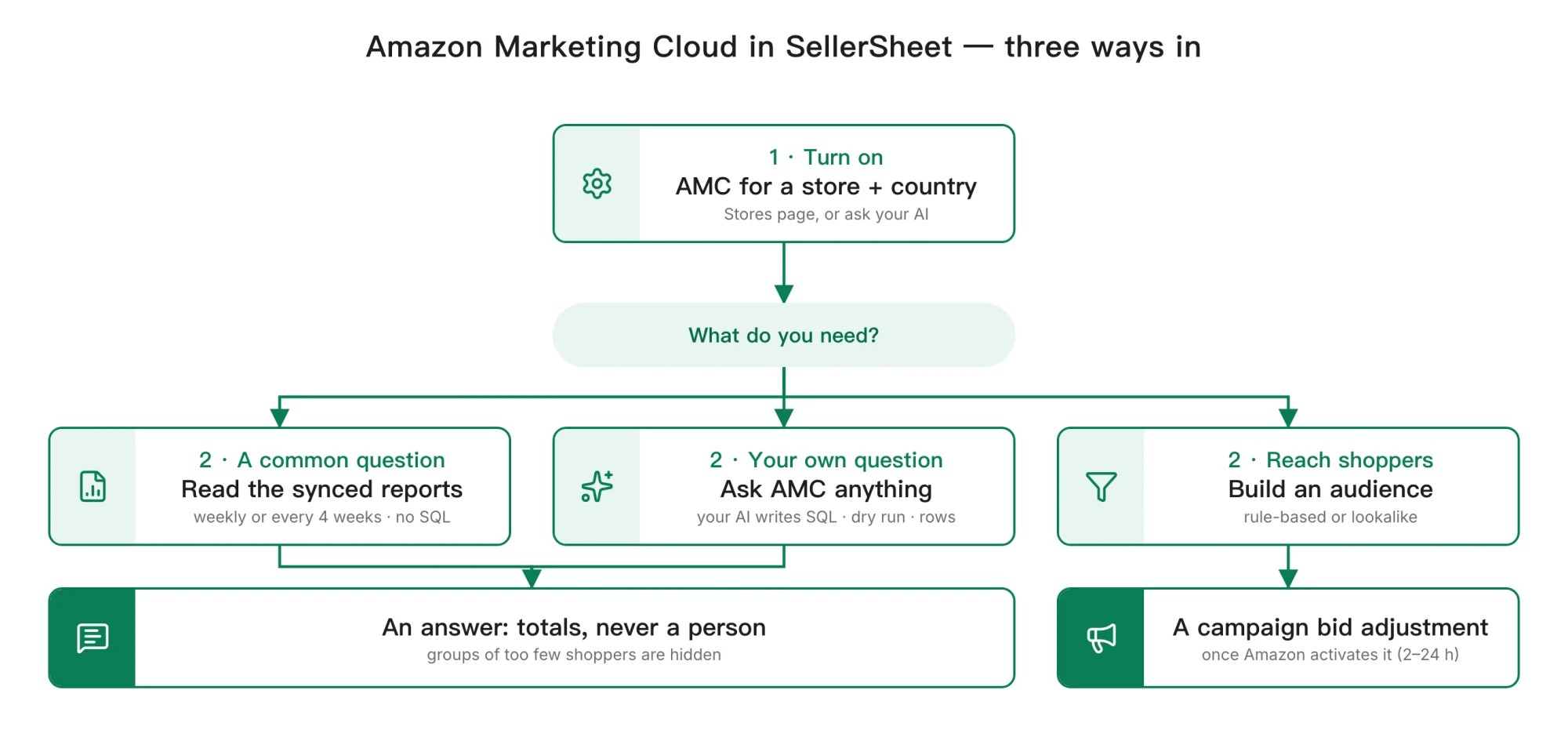
Once AMC is on, your AI has three ways in: read the AMC reports SellerSheet syncs, ask AMC a question of your own, or build an audience your campaigns can use.
Before you start
- A SellerSheet account with the store connected and Ads authorized. Both are on Settings → Stores & Marketplaces in the SellerSheet app; see Stores & Marketplaces.
- An MCP client connected, such as Claude, ChatGPT or Cursor: see How to Connect SellerSheet MCP.
- Campaigns delivered in the last 28 days in that country. Amazon offers AMC only to advertisers with recent campaigns.
- The AMC terms accepted, once per Ads region. Sign in at advertising.amazon.com/marketing-cloud with the Amazon login that connected Ads to SellerSheet, and accept the terms. Do it once for each region you advertise in: North America, Europe (which includes the Middle East and India) and Far East. This is your own agreement with Amazon, so only you can accept it; SellerSheet never clicks it for you.
- The right access. On the Stores page, the owner or an admin turns AMC on. Your AI needs Ads write access on the store for anything that creates, changes or deletes something: turning AMC on, a saved query or schedule, an audience, or an audience bid adjustment on a campaign. Running queries and reading results needs Ads read. A member gets these on the Stores page (⋯ → Access), and a restricted API key on Settings → API & MCP; see Stay in control.
Already using AMC?
If you already have a self-service AMC instance, made in the Ads console, by Ads Agent or by another tool, SellerSheet uses that same instance. Nothing new is created. AMC accounts an agency set up for you, and paid AMC accounts, are not supported.
Step 1: turn AMC on, per store and Ads country
AMC is off until you turn it on, one store and one Ads country at a time. A store that advertises in the US and Canada gets one instance for each country you turn on.
An AMC instance can never be deleted
Amazon has no way to delete an AMC instance. It holds only your own advertising data, and turning it on changes nothing in your campaigns, but it stays in your Ads account. That is why the Stores page warns you first, and why your AI asks before it turns AMC on.
On the Stores page
- Open Settings → Stores & Marketplaces in the SellerSheet app.
- On the store's row, open ⋯ and choose Turn on Marketing Cloud…. It is greyed out while the store's Ads authorization is not Authorized, or when every marketplace with an Ads profile already has AMC on.
- Pick the Marketplace and click Turn on.
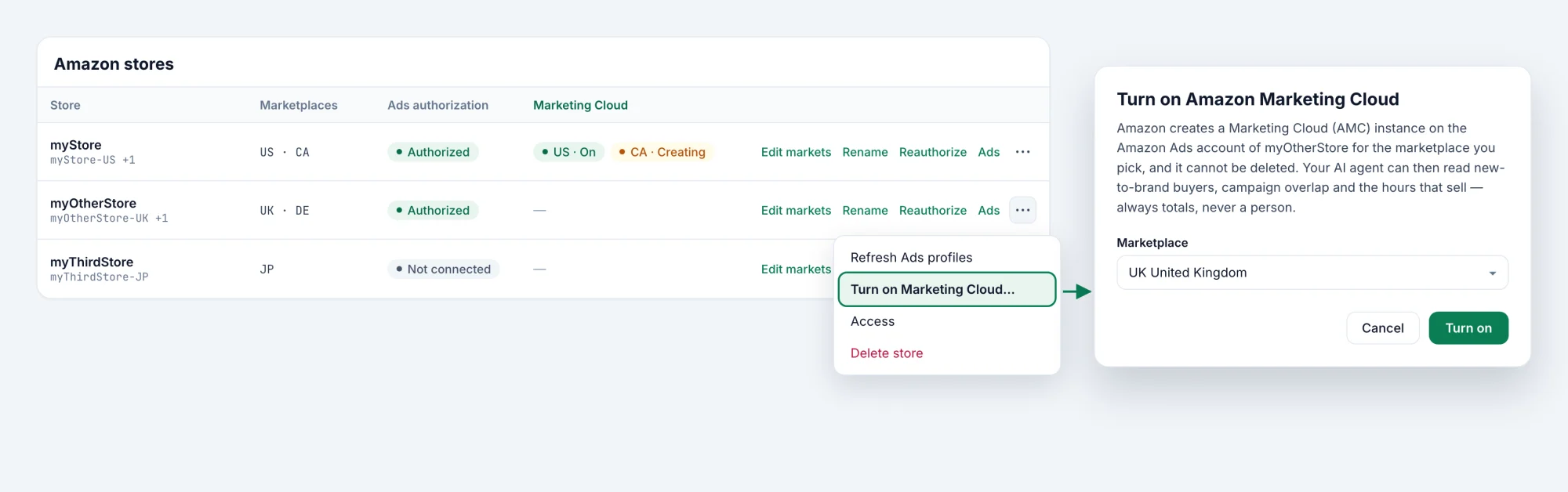
The Marketing Cloud column then shows one chip per country: On, Creating or Failed. Amazon can take up to five minutes to build a new instance. While it says Creating, open the dialog again and click Check again.
If the terms are not accepted yet, the dialog stays open with Amazon's own message and an Open Amazon Marketing Cloud link. Accept the terms there, come back, and click Turn on again. Every control on that page is described in Stores & Marketplaces.
Or ask your AI
Prompt: turn it on
"Turn on Amazon Marketing Cloud for myStore-US."
Your AI calls ads_amc_turn_on with the store and the Ads country, after asking you to confirm. Calling it again is safe: once AMC is on, it only reads. get_user_context tells your AI, for each store and country, whether AMC is on, so it knows before it starts.
Way 1: ask AMC anything
Ask your question in plain words. Your AI writes the AMC SQL, runs it on your instance and reads the answer back as rows.
Prompt: a question of your own
"Using AMC for myStore-US over the last 28 days: for each campaign, how many shoppers clicked an ad and then bought within 14 days, and how many of them were new to the brand? Group small campaigns together so AMC doesn't hide them."
What your AI does behind that prompt:
- Checks what is already synced.
list_amc_templateslists the AMC reports SellerSheet keeps (Way 2). When one answers the question, your AI reads it instead of running a new query. - Reads the tables.
ads_list_data_sourceslists the tables your instance can query;ads_get_data_sourcegives a table's columns and which ones AMC keeps private. - Checks the SQL with a dry run.
ads_create_workflow_executionwithdry_runvalidates the query in seconds without computing anything or using Amazon's AMC allowance. - Runs it and waits. The same tool runs the query over the time window your AI chose;
ads_get_workflow_executionreports its status. Most queries finish within two minutes. If AMC refuses the SQL, Amazon's reason comes back and your AI fixes the query by it. - Reads the answer as rows.
ads_get_workflow_execution_download_urlsreturns the result as rows, never download links, with a count of the rows AMC hid.
Your AI can also list the runs on your instance, including ones started in the AMC console or by a schedule, with ads_list_workflow_executions, and cancel one still running with ads_update_workflow_execution.
Here is the dry run from step 3, as your AI sends it:
In an AI client (MCP)
{
  "name": "ads_create_workflow_execution",
  "arguments": {
    "store": "myStore-US",
    "country_code": "US",
    "sql_query": "SELECT campaign, SUM(impressions) AS impressions, COUNT(DISTINCT user_id) AS reach FROM sponsored_ads_traffic GROUP BY campaign",
    "time_window_type": "EXPLICIT",
    "time_window_start": "2026-09-01T00:00:00",
    "time_window_end": "2026-10-01T00:00:00",
    "time_window_time_zone": "America/Los_Angeles",
    "dry_run": true
  }
}
From code (Tool API)
curl -X POST https://api.sellersheetai.com/api/v1/tools/ads_create_workflow_execution \
  -H "Authorization: Bearer $SELLERSHEET_API_KEY" \
  -H "Content-Type: application/json" \
-d '{"store":"myStore-US","country_code":"US","sql_query":"SELECT campaign, SUM(impressions) AS impressions, COUNT(DISTINCT user_id) AS reach FROM sponsored_ads_traffic GROUP BY campaign","time_window_type":"EXPLICIT","time_window_start":"2026-09-01T00:00:00","time_window_end":"2026-10-01T00:00:00","time_window_time_zone":"America/Los_Angeles","dry_run":true}'Good to know
- AMC runs up to 10 queries at a time on one instance.
- A result over 20 MB is too big to read back. Ask for broader groups, or a shorter window.
- A purchase can be credited to an ad up to 30 days after the ad ran, so per-ad numbers for the last few weeks can still grow. That is also why the four-weekly reports below wait 15 days.
Way 2: read the synced AMC reports
The common questions don't need a new query each time. For every store and country whose AMC is on, SellerSheet runs a set of proven AMC queries on a schedule and keeps their rows next to your other synced reports. Your AI reads them like any other report, with no SQL and no waiting.
| Report | The question it answers | How often |
|---|---|---|
| rpt_amc_ntb_by_campaign | How many of each campaign's purchases came from shoppers new to the brand? | Weekly |
| rpt_amc_hour_of_day | At which hours of the day do clicks, spend and the purchases they lead to happen? | Weekly |
| rpt_amc_atc_by_search_term | For each search term shoppers clicked, how many added to cart and how many ordered? | Weekly |
| rpt_amc_campaign_overlap | Which pairs of campaigns reach the same shoppers, and how much of each one's reach is shared? | Every 4 weeks |
| rpt_amc_impressions_per_shopper | How many ads does a shopper see, and how does buying climb with it? | Every 4 weeks |
| rpt_amc_ntb_gateway_asins | Which advertised products bring shoppers to the brand for the first time? | Every 4 weeks |
| rpt_amc_keyword_halo | Which keywords sell the brand's other products beyond the advertised one? | Every 4 weeks |
| rpt_amc_time_to_conversion | How long after the ad do purchases happen? | Every 4 weeks |
| rpt_amc_first_vs_attributed_term | Which search term did buyers click first, and which last before buying? | Every 4 weeks |
| rpt_amc_path_to_conversion | How many different campaigns did buyers click before their first purchase? | Every 4 weeks, off by default |
| rpt_amc_cross_sell_next_purchase | After a shopper's first purchase of a brand product, which product do they buy next? | Every 4 weeks, off by default |
- Weekly reports cover Monday to Sunday in the marketplace's own time zone. Amazon runs them each Monday.
- Every 4 weeks reports cover 28 days and run 15 days after the period ends, once late purchases have been attributed.
- The two reports off by default rarely show anything for a small Sponsored Products advertiser: most of their rows fall under AMC's privacy floor.
- When rows first appear: sync starts from the newest finished period, with no history before it. Weekly reports fill after the next Monday run; a four-weekly report can take up to four weeks to show its first period.
Prompt: read the synced reports
"From the synced AMC reports for myStore-US, which campaigns had the lowest new-to-brand share last week? And which campaign pairs share more than a third of their reach over the last 28 days?"
Your AI reads list_amc_templates for each report's question, its table and how to read its rows, then queries the table with query_report_data (get_table_schema gives the columns). Because the rows sit beside your other reports, it can combine them in one answer, for example new-to-brand share next to the campaign's spend and sales.
Three rules for reading the rows
Read the rows right
- One hidden row per period. Each period has one row with
hiddenset to true. It adds up everything AMC suppressed under its privacy floor, so totals still match. It has no labels: include it in totals, leave it out of per-campaign or per-term answers. A count of distinct shoppers summed into it can count one shopper twice. period_startis the first day of the period, in the marketplace's time zone, not a day of activity.period_dayssays whether the period is 7 or 28 days long.- AMC purchases count only the advertised product. The purchases in your Ads reports also count your brand's other products bought after the ad, so the AMC number is usually lower. It measures something different; it is not wrong.
Way 3: build an audience for your campaigns
An answer tells you who your shoppers are. An audience lets you act on it: AMC turns a group of shoppers into an audience in your Ads account, and a campaign can adjust its bids for the shoppers in it. There are two kinds:
- Rule-based: the shoppers an AMC query selects, for example "shoppers who added a product to their cart in the last 30 days but didn't buy".
- Lookalike: shoppers Amazon finds to be similar to a seed the query selects, for example everyone your ads reached.
Prompt: an audience
"For myStore-US, build an audience of the shoppers who added one of my products to their cart in the last 30 days but didn't buy. If that's too small, propose a lookalike instead. Show me the plan before you create anything."
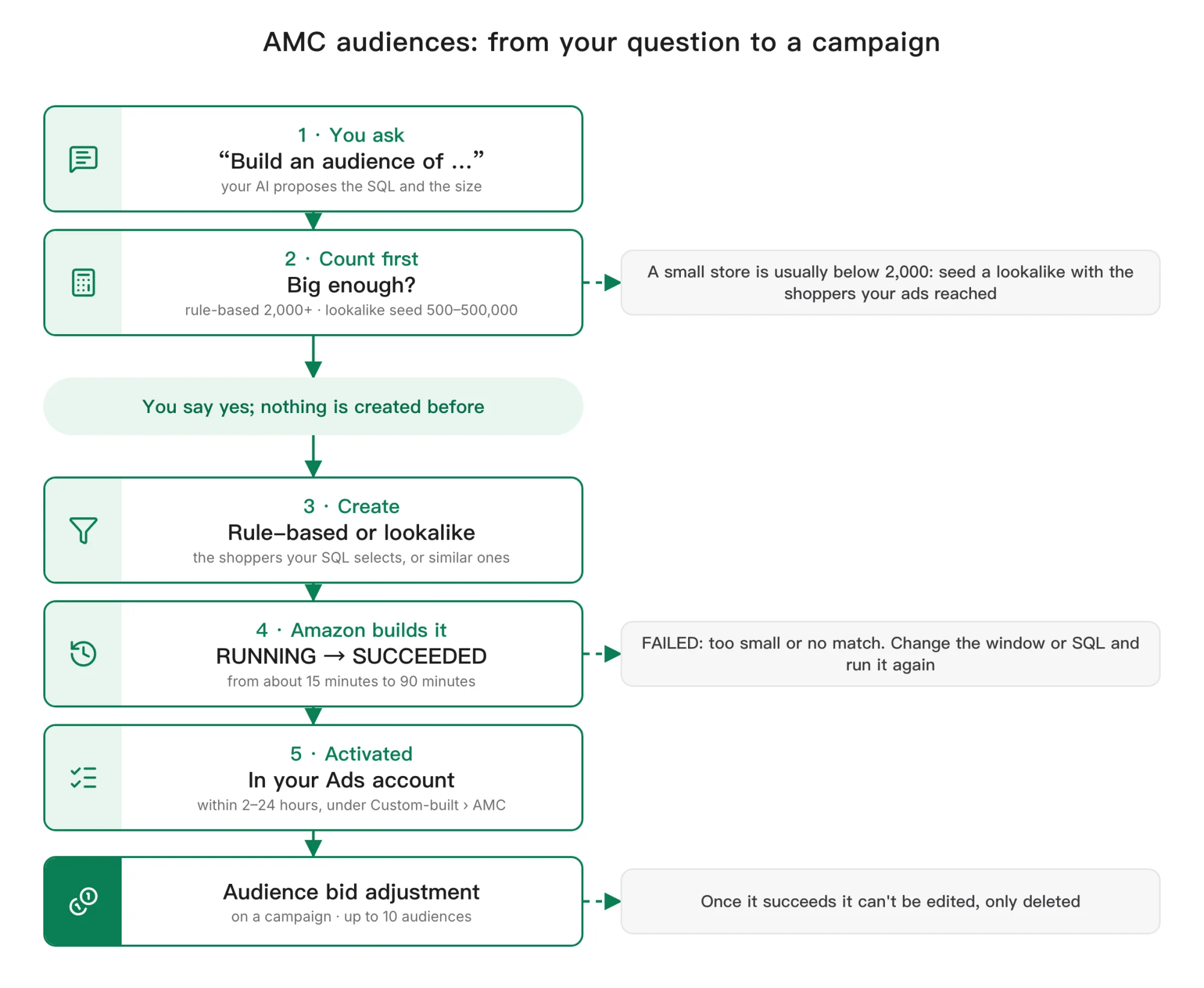
What your AI does behind that prompt:
- Counts first. It counts the same shoppers with
ads_create_workflow_execution, so it knows whether the audience can pass Amazon's minimum size (below). - Proposes, then waits for your yes. It shows you the audience it plans: who is in it, roughly how many, over which days. The audience tools are gated, so nothing is created before you agree.
- Creates it.
ads_create_query_based_audiencemakes a rule-based audience;ads_create_lookalike_audiencemakes a lookalike, where you also choose how far from the seed it reaches, fromMOST_SIMILARtoMOST_BROAD. - Waits for Amazon.
ads_get_query_based_audience_by_audience_execution_idfollows the build: RUNNING, then SUCCEEDED or FAILED. A rule-based audience usually takes 15–20 minutes and a lookalike up to about 90; a long RUNNING is normal for one that succeeds.ads_get_all_query_based_audiences_by_instance_idlists every audience on your instance, including ones made in the AMC console. - Finds it in your Ads account. Amazon activates a SUCCEEDED audience within 2–24 hours. It then appears in
ads_list_targetable_entities, for Sponsored Products under Audience Category › Custom-built › AMC, with the audience ID a campaign takes. - Adds it to a campaign. With your go-ahead, your AI adds the audience to a campaign as an audience bid adjustment, with
ads_update_campaign. A campaign takes up to 10 audiences.
Size decides whether an audience works
- A rule-based audience needs at least 2,000 shoppers; aim for 2,500. Below that, Amazon builds it for 15–20 minutes and then it ends FAILED: "did not meet the minimum required size". A small store's buyers or ad clickers are usually far below the floor.
- A lookalike needs a seed of 500 to 500,000 shoppers, and a count above 500 is not enough. Amazon keeps only the shoppers it can match, so a seed of a few hundred ad clickers can still end FAILED after about 20 minutes: "did not find a sufficient match for seed users".
- On a small store, seed the lookalike with reach: the tens of thousands of shoppers your ads were shown to. At the closest setting,
MOST_SIMILAR, Amazon aims for about 500,000 to 1 million similar shoppers in Europe and the Americas, and 200,000 to 300,000 in Asia.
Changing or removing an audience
- A SUCCEEDED audience can't be edited, only deleted, with
ads_delete_query_based_audience_by_audience_execution_id. Take it out of every campaign first. Deleting can't be undone, so your AI asks you before it does. - A FAILED audience can be fixed and run again with
ads_update_query_based_audience_by_audience_execution_id: a new time window, or new SQL. - Amazon refreshes an audience on its own. One that no campaign uses is refreshed less often and switched off after about 100 days.
- Every audience query is logged, like every other AMC query SellerSheet runs.
Save a query and run it on a schedule
When a question is worth asking every week, your AI can save its query on your instance and have Amazon run it on a schedule. For the questions the synced reports already answer (Way 2), you don't need this.
Prompt: a weekly query
"Save the new-to-brand query we just ran for myStore-US and run it every Monday. Create the schedule paused, and show me the first run before you turn it on."
- Save the query. Your AI checks the SQL with a dry run first, then saves it under a name with
ads_create_workflow.ads_list_workflowsandads_get_workflowread the saved queries.ads_update_workflowreplaces one, and every schedule that runs it uses the new SQL from then on.ads_delete_workflowremoves one once no schedule runs it; its past runs stay. - Schedule it, Daily or Weekly, with
ads_create_schedule. A schedule can be created paused and turned on later withads_update_schedule, which also changes its period.ads_list_schedulesandads_get_scheduleread them;ads_delete_scheduleremoves one and keeps its saved query. - Read each run in time. Every run appears in
ads_list_workflow_executions. Its result can be downloaded for about a day, so your AI reads it withads_get_workflow_execution_download_urlsbefore it expires.
Saving, changing or deleting a query or a schedule changes your instance, so your AI asks you first.
SellerSheet's own queries are read-only
The saved queries and schedules behind the synced reports show up in the same lists, named sellersheet_…. The tools refuse to change, delete, re-schedule or cancel them. They are SellerSheet's, so leave them as they are; removing the store from SellerSheet deletes them.
Browse what campaigns can target
ads_list_targetable_entity_paths lists the taxonomy paths of what a sponsored-ads campaign can target, and ads_list_targetable_entities lists what sits under one; for example, your AMC audiences under Audience Category › Custom-built › AMC.
What you see in Amazon's own screens
SellerSheet works inside your own AMC instance, so its work shows in the AMC console:
- Its queries and runs. The queries your AI runs, and the runs that fill the synced reports, appear in the instance's run list.
- Saved queries and schedules: your own, and SellerSheet's, named
sellersheet_…, which run the weekly reports. The tools never change SellerSheet's; leave them as they are in the console too. - The audiences your AI creates, listed in the instance, and once active in your Ads account under Custom-built › AMC.
- Amazon sees the queries, as it sees every query run in AMC.
Your AMC results are yours and confidential under Amazon's AMC terms. SellerSheet uses a store's results only for that store: never shared with another store, and never pooled into benchmarks. It keeps the synced rows for 13 months.
What isn't available
- Amazon's AMC SQL generator, which Amazon offers as a closed beta. Today your AI writes the SQL itself, checks it against your instance's own table descriptions and with a dry run, and fixes it from Amazon's reason when AMC refuses it.
- Managed-account features: AMC's Clean Rooms collaborations, adding advertisers, and creating or deleting instances are not available on an instant instance. AMC Custom Models is offered by Amazon in North America only.
Which way do you need?
| What you need | Ask your AI to… | Tools behind it |
|---|---|---|
| AMC on for a store and country | Turn on Amazon Marketing Cloud for the store | ads_amc_turn_on (or the Stores page) |
| A common question: new to brand, overlap, hour of day, time to conversion | Answer from the synced AMC reports | list_amc_templates, query_report_data |
| A question of your own | Write and run an AMC query | ads_create_workflow_execution, ads_get_workflow_execution, ads_get_workflow_execution_download_urls |
| A run that's taking too long, or was started by mistake | Find it and cancel it | ads_list_workflow_executions, ads_update_workflow_execution |
| Shoppers to bid on: cart abandoners, past buyers, or people like them | Build an audience and add it to a campaign | ads_create_query_based_audience, ads_create_lookalike_audience, ads_list_targetable_entities, ads_update_campaign |
| The same question every day or week | Save the query and schedule it | ads_create_workflow, ads_create_schedule, ads_list_workflow_executions |
FAQ
What does Amazon Marketing Cloud answer that Ads reports cannot?
Questions that follow the same shopper across ads and purchases: how many of a campaign's buyers were new to your brand, how many ads a shopper saw before buying, which campaigns reach the same people, how long after the ad the purchase came, and which search term a buyer clicked first versus last. Ads reports total each campaign on its own, so they cannot answer these.
Does AMC show me individual shoppers?
No. AMC answers only with totals over groups of shoppers, and it hides any group with too few shoppers in it. Nothing in a result identifies a person.
Can I turn AMC off or delete it?
Amazon cannot delete an AMC instance once it exists, which is why the Stores page warns you and your AI asks before turning it on. The instance only holds your own advertising data and changes nothing in your campaigns. If you remove the store from SellerSheet, SellerSheet deletes its saved queries and schedules from the instance; the instance itself stays in your Ads account.
I already use AMC in the Ads console. Will SellerSheet create a second instance?
No. If you already have a self-service AMC instance, made in the Ads console, by Ads Agent or by another tool, turning AMC on in SellerSheet finds that instance and uses it. AMC accounts set up for you by an agency, or a paid AMC account, are not supported.
Why do AMC purchases differ from my Ads reports?
AMC counts purchases of the advertised product only. The purchases in Amazon's Ads reports also count your brand's other products bought after the ad. The two numbers measure different things, so AMC's is usually lower.
Do I need to know SQL?
No. You ask in plain words. Your AI first checks whether a synced AMC report already answers the question; if not, it writes the SQL, checks it with a dry run and fixes it from Amazon's reason if AMC refuses it.
Can my AI build audiences from AMC?
Yes, but only after you say yes. It can create a rule-based audience, the shoppers an AMC query selects (at least 2,000 of them), or a lookalike audience, shoppers similar to a seed of 500 to 500,000. Once Amazon activates it in your Ads account, within 2–24 hours, your AI can add it to a campaign as an audience bid adjustment. On a small store, a lookalike seeded with the shoppers your ads reached is usually the one that works.