
Webhooks
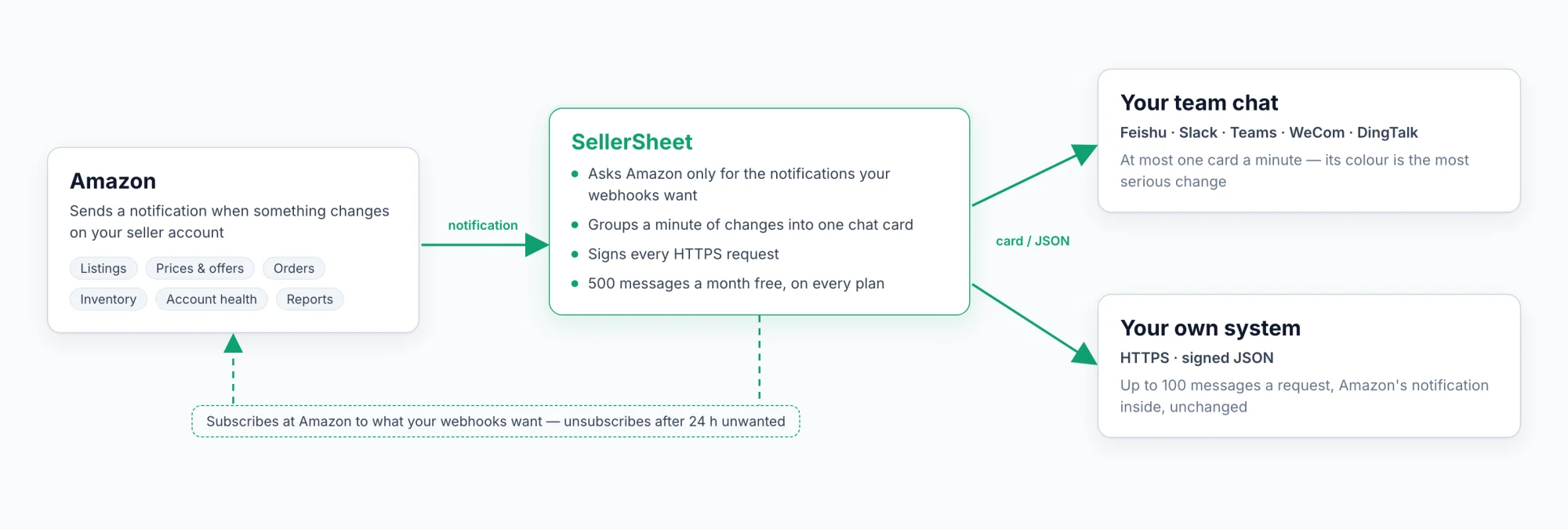
Amazon's notifications about your stores — listings, prices and offers, orders, inventory, sales, finance, account health and more — delivered to your team chat, or to your own system as signed JSON.
TL;DR
- Amazon tells SellerSheet when something changes on your listings, prices, offers, orders, inventory or account. A webhook passes each message on: as a card in your team chat (Feishu / Lark, Slack, Microsoft Teams, WeCom, DingTalk), or as signed JSON to your own system over HTTPS.
- Choose from 23 of Amazon's notifications, in groups; a new webhook starts with six. Hourly metrics and per-change streams go to HTTPS only.
- Set it up in Settings → Webhooks → Add webhook (workspace owner or admin), then click Send test.
- 500 delivered messages a month are free on every plan. Beyond them, each delivered message is paid from your Credits. Test, failed and skipped messages are never billed.
What webhooks are for
Amazon sends a notification when something changes on your seller account: a listing is suppressed or becomes buyable again, your offer loses the featured offer on price, someone edits your brand's detail page, another seller joins your ASIN, a buyer asks to cancel an order, your FBA stock runs out, your account goes at risk. A webhook delivers those messages where your work happens:
- A team chat group. One card a minute at most, the changes grouped by store, with Amazon's own field names so a person — or an AI agent in the group — can act on them.
- Your own system. An ERP, a database or your own code receives every message as signed JSON with Amazon's notification inside, unchanged.
Every message is built only from what Amazon sent; SellerSheet makes no Amazon call to add to it. Amazon is the source of truth.
Add a webhook
You need to be the owner or an admin of the workspace. Webhooks belong to the workspace you are in: switch to the right one first.
Get the address
Follow the steps for your destination under Destinations and copy the address. For HTTPS, also make up a signing secret.
Add the webhook
In the SellerSheet app, open Settings → Webhooks → Add webhook:
- Destination type: Feishu, Slack, Microsoft Teams, WeCom, DingTalk or HTTPS. It cannot be changed later.
- Name: unique in the workspace, for example ERP feed or Ops group.
- The address, and the Signing secret where the destination has one.
- Chat apps only: Language — 中文 or English, the language of the cards in the group. A new webhook starts on the language you use the app in; change it any time. See Card language.
- Notifications and stores: which notifications, for which stores. The six original notifications start ticked. See Choose notifications and stores.
- Include marketplaces not connected to SellerSheet (on by default).
- Chat apps only: Competing offers: only when the sellers or the Buy Box winner change (on by default). A price-only change is then filtered — not posted and not billed.
- Tick the per-message pricing box, then Create webhook.
A webhook can be created, or turned back on, only while your organization can pay for its next message: free messages left this month, or Credits.
Send a test
Click Send test on the webhook's row (or in its edit panel). One sample message for each notification the webhook takes, for a made-up store, arrives at the destination; on a chat app the card title ends in "· test" ("· 测试" when the webhook's language is 中文). If the destination refuses them, its answer is shown — see Troubleshooting. Test messages are never billed.
After that, the list shows each webhook's Status, This month (messages delivered) and Last delivery. Edit webhook changes everything but the destination type; a blank address or secret keeps the saved one, and Enabled turns the webhook on or off. Delete webhook stops it at once; its delivery log stays for 30 days. A workspace keeps up to 10 webhooks.
The address and the secret are stored encrypted and never shown again: the list shows only the address's last four characters.
Destinations
| Destination | What arrives | Signing secret |
|---|---|---|
| Feishu / Lark | One interactive card a minute at most | Optional — Feishu's signature verification |
| Slack | One message a minute at most | — |
| Microsoft Teams | One Adaptive Card a minute at most | — |
| WeCom | One markdown message a minute at most | — |
| DingTalk | One markdown message a minute at most | Optional — DingTalk's 加签 (Sign) |
| HTTPS | Signed JSON, up to 100 messages per request | Required |
A chat bot with keyword security needs the keyword SellerSheet — every card title contains it. A bot or an endpoint with an IP allowlist needs SellerSheet's IP address: contact support for it.
Feishu / Lark
- In the group, open Settings → Bots → Add bot → Custom bot.
- Copy its webhook address:
https://open.feishu.cn/open-apis/bot/v2/hook/…(Lark:https://open.larksuite.com/open-apis/bot/v2/hook/…). - Optional security: turn on signature verification and paste the secret into Signing secret, or turn on keyword security with the keyword
SellerSheet.
Slack
- In your Slack app, turn on Incoming Webhooks.
- Click Add New Webhook and pick the channel.
- Copy the URL:
https://hooks.slack.com/services/…
Microsoft Teams
- In the channel, open Workflows.
- Choose Post to a channel when a webhook request is received and finish the workflow.
- Copy the URL it gives you; its host ends in
logic.azure.comorpowerplatform.com.
WeCom
- In the group, open ··· → Group robots → Add.
- Copy its webhook address:
https://qyapi.weixin.qq.com/cgi-bin/webhook/send?key=…
WeCom takes shorter messages than the other apps, so its card holds fewer lines before "+N more".
DingTalk
- In the group settings, open Bots → Add bot → Custom.
- Under security, choose 加签 (Sign) and paste the secret that starts with
SECinto Signing secret, or choose custom keywordSellerSheet. - Copy the address:
https://oapi.dingtalk.com/robot/send?access_token=…
HTTPS
- Have an endpoint that accepts a
POSTwith a JSON body, on anhttps://address on the public internet (port 443). Private and internal addresses are refused, and redirects are not followed. The address is checked again before every request. - Make up a long random signing secret (for example the output of
openssl rand -hex 32), paste it into Signing secret and keep it in your receiver. - In your receiver, verify the signature of every request, answer any
2xxwithin 10 seconds, then process the messages.
What arrives: The HTTPS body.
Choose notifications and stores
The Notifications and stores table lists every notification Amazon offers, in groups: a row per notification and a column per store.
- Tick All stores to take every store of the workspace, including the stores you connect later, or tick stores one by one.
- A new webhook starts with the six original notifications ticked — Listing issues, Listing status, Brand content, Pricing health, Competing offers and Account health — on all stores, except Brand content, which starts on one store. Tick any other row you want.
- Grey rows cannot be ticked, and say why: Coming as data in your report tables — not as webhooks (Amazon Ads), Not available yet (shipment tracking milestones), or HTTPS only on a chat destination. See The notifications.
- High volume marks, on HTTPS, the hourly metrics and the notifications with a message for every change: a busy store can send many a day, and each delivered message counts toward your usage.
- Some notifications are sent for some marketplaces only: FBA Onsite shipments, for Brazil (BR only). A store without Brazil cannot be ticked for it. All stores is always allowed: Amazon sends nothing for the other stores.
- One copy per store: Amazon sends Brand content and Product type definitions once for each store of a seller, and the content is the same across them. Tick one store to get each change once; with more, you get one copy per store, and the table warns you.
- Messages that name no marketplace — account health, reports, feeds, Data Kiosk queries, Multi-Channel Fulfillment orders, self-fulfilled quantity, external fulfillment shipments — reach a webhook that takes the notification on any store of that seller.
- A chat destination leaves HTTPS-only ticks out. If you ticked some before choosing a chat app, the form says how many are left out; they are not saved.
- Include marketplaces not connected to SellerSheet: some notifications cover your whole seller account, so a message can be about a marketplace you have not connected to SellerSheet. With the box on, those messages arrive, marked "(not connected)" on a card and
"connected": falseover HTTPS. Turn it off to drop them.
Amazon subscriptions follow your webhooks
SellerSheet asks Amazon for exactly the notifications your webhooks want, and nothing else:
- One Amazon subscription per seller account, region and notification serves every webhook. A new webhook on a store and notification that is already subscribed starts receiving at once.
- A notification no webhook wants yet is subscribed at Amazon within about a minute.
- When no active webhook has wanted a notification of a store for 24 hours, SellerSheet unsubscribes it at Amazon. If a webhook wants it again, it is subscribed again within about a minute. What Amazon published while it was unsubscribed is not sent.
- A small marker on a store's cell explains a subscription that is ending (Amazon's subscription ends … unless a webhook takes it again.) or one Amazon refused: another application holds this notification for the seller; this notification needs a permission the store's authorization does not include (SellerSheet tries again daily — if it keeps failing, re-authorize the store or contact support); or SellerSheet tries again.
The notifications
The Webhooks page lists the notifications Amazon's Selling Partner API sends that SellerSheet can deliver, and Amazon Ads' two Marketing Stream datasets, in 9 groups:
- Delivered now — 23 notifications. The original six are ticked on a new webhook (default below).
- Not available yet — Shipment tracking milestones. Amazon needs each shipment registered first.
- Amazon Ads — not webhooks. Ads performance arrives as data in your report tables (Amazon Marketing Stream), so the two rows are grey on every destination.
On a chat destination, an HTTPS-only notification is grey too, with its reason. On HTTPS those rows can be ticked, and the hourly metrics and the ones with a message for every change are marked High volume.
Not offered: Amazon's three Brazil and Mexico tax invoice notifications. Amazon allows them only to apps it has granted a tax-invoicing role, and the SellerSheet app does not have that role.
Listings
| Notification | What it tells you | Delivered | Channels |
|---|---|---|---|
| Listing issues | The issues on a listing change: the severities and enforcement actions now in force, or all clear. Never the issue text. | Now (default) | HTTPS, chat |
| Listing status | A listing becomes buyable or not, shows in search or not, or is deleted. | Now (default) | HTTPS, chat |
| Brand content | An attribute of a catalog item of your brand changes — title, bullets, images and so on. One copy per store. | Now (default) | HTTPS, chat |
| Product type change | An ASIN's product type changes; what its listings must say may change with it. | Now | HTTPS, chat |
| Self-fulfilled quantity | A SKU's self-fulfilled quantity changes. | Now | HTTPS only — a message for every change |
| Product type definitions | Amazon publishes a new version of a marketplace's product type definitions, naming any new product types. One copy per store. | Now | HTTPS only — a signal for your own code |
Pricing & offers
| Notification | What it tells you | Delivered | Channels |
|---|---|---|---|
| Pricing health | Your offer cannot be the featured offer because of its price, with Amazon's reference prices. ASIN only, no SKU. | Now (default) | HTTPS, chat |
| Competing offers | The offers on an ASIN you sell change while another seller is on it: the Buy Box, prices, sellers. | Now (default) | HTTPS, chat |
| Business offers (B2B) | The same for the business (B2B) offers on an ASIN. | Now | HTTPS only — a message for every change |
| Fee promotions | Amazon offers you a fee promotion: what it is, when it runs, the discount. | Now | HTTPS, chat |
Orders & fulfillment
| Notification | What it tells you | Delivered | Channels |
|---|---|---|---|
| Order changes | An order's status changes, or the buyer asks for a change such as a cancellation. | Now | HTTPS, chat |
| Multi-Channel Fulfillment orders | A Multi-Channel Fulfillment order's status, packages and tracking. | Now | HTTPS, chat |
| FBA Onsite shipments (Brazil) | Amazon creates or cancels a shipment for an order. BR only. | Now | HTTPS, chat |
| External fulfillment shipments | A shipment from your own fulfillment location changes status. | Now | HTTPS, chat |
| Shipment tracking milestones | A shipment's carrier tracking milestones. | Not yet | HTTPS, chat |
Inventory
| Notification | What it tells you | Delivered | Channels |
|---|---|---|---|
| FBA inventory | A SKU's FBA quantities change — fulfillable, inbound, reserved, unfulfillable — per marketplace. | Now | HTTPS only — a message for every change |
| Hourly inventory | Each hour: your highly available inventory, in units. | Now | HTTPS only — hourly metrics |
Sales & traffic
| Notification | What it tells you | Delivered | Channels |
|---|---|---|---|
| Hourly sales | Each hour: ordered units and revenue. | Now | HTTPS only — hourly metrics |
| Hourly page views | Each hour: detail page views. | Now | HTTPS only — hourly metrics |
Finance
| Notification | What it tells you | Delivered | Channels |
|---|---|---|---|
| Transactions | A transaction posts to your account: its type, amount and related IDs, such as the order. | Now | HTTPS only — a message for every change |
Account
| Notification | What it tells you | Delivered | Channels |
|---|---|---|---|
| Account health | The seller account's status changes between normal, at risk and deactivated. | Now (default) | HTTPS, chat |
Reports & data — for developers
| Notification | What it tells you | Delivered | Channels |
|---|---|---|---|
| Report finished | A report request finishes — done, cancelled or fatal — with the report's ID and document ID. | Now | HTTPS only — a signal for your own code |
| Feed finished | A feed finishes — done, cancelled or fatal — with its result document ID. | Now | HTTPS only — a signal for your own code |
| Data Kiosk query finished | A Data Kiosk query finishes, with its data or error document ID. | Now | HTTPS only — a signal for your own code |
Amazon Ads — Marketing Stream
| Dataset | What it holds | Delivered | Channels |
|---|---|---|---|
| Ads performance (hourly) | Each hour: impressions, clicks, spend, conversions and sales, per campaign. | As data in your report tables — not a webhook | — |
| Converted products (daily) | Each day: the products bought after an ad. | As data in your report tables — not a webhook | — |
Every message's summary has a readable text and a severity, plus the fields of its notification. Amazon's code for each notification (messageType) and its fields: Webhook message schema.
What you will see
- When messages arrive. Listing issues and Listing status come about 11–19 minutes after the change; Pricing health and Brand content within about a minute. Of the six defaults, Competing offers is usually the busiest.
- Issues cleared after a delete. About 20 minutes after you delete a SKU, Amazon clears its issues; that message is delivered like any other.
- The last competitor leaving. Amazon notifies only while another seller is on the ASIN, so the moment the last one leaves produces no message.
- Report finished includes SellerSheet's own reports: the ones it requests to keep your store's data in sync, many a day.
- Use a message as confirmation. When you change a listing, a price or brand content, the message tells you Amazon has applied it.
Severity and colour
severity | Card colour | When |
|---|---|---|
critical | Red | A listing suppressed or its catalog item removed; the account deactivated; an order that cannot be fulfilled |
warning | Orange | Other listing issues; a listing not buyable or deleted; a product type changed; pricing health; another seller holds the Buy Box; the account at risk; out of stock, self-fulfilled or at FBA; a buyer asks to cancel, or an order is cancelled; a fulfillment order partly complete or cancelled; a shipment cancelled; a report, feed or Data Kiosk query cancelled or failed |
info | Blue | Everything else — for example brand content, competing offers where you hold the Buy Box or nobody does, hourly metrics, transactions, fee promotions, a finished report |
recovery | Green | Issues cleared; a listing buyable again; the account back to normal; a Multi-Channel Fulfillment order complete |
What a chat card shows
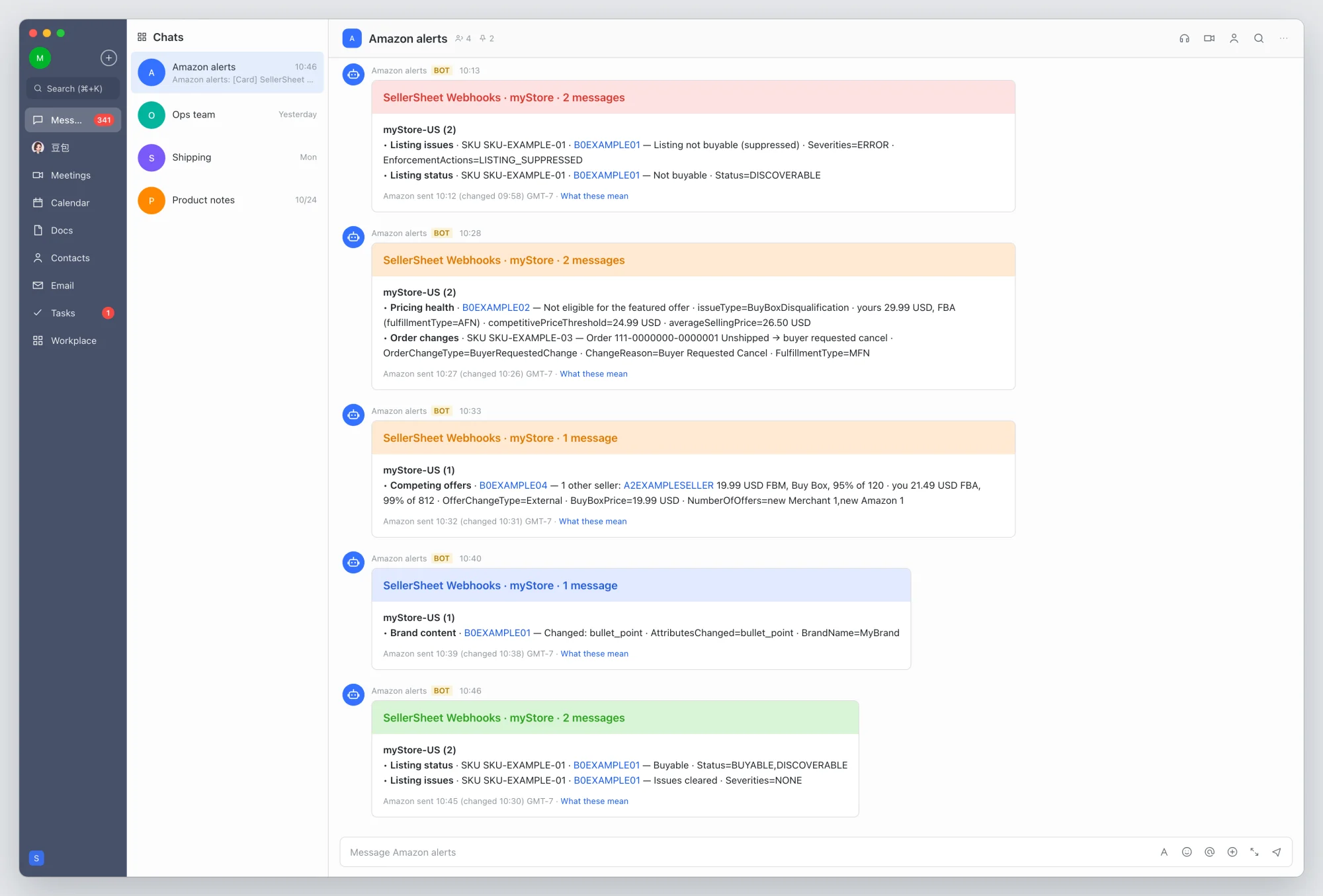
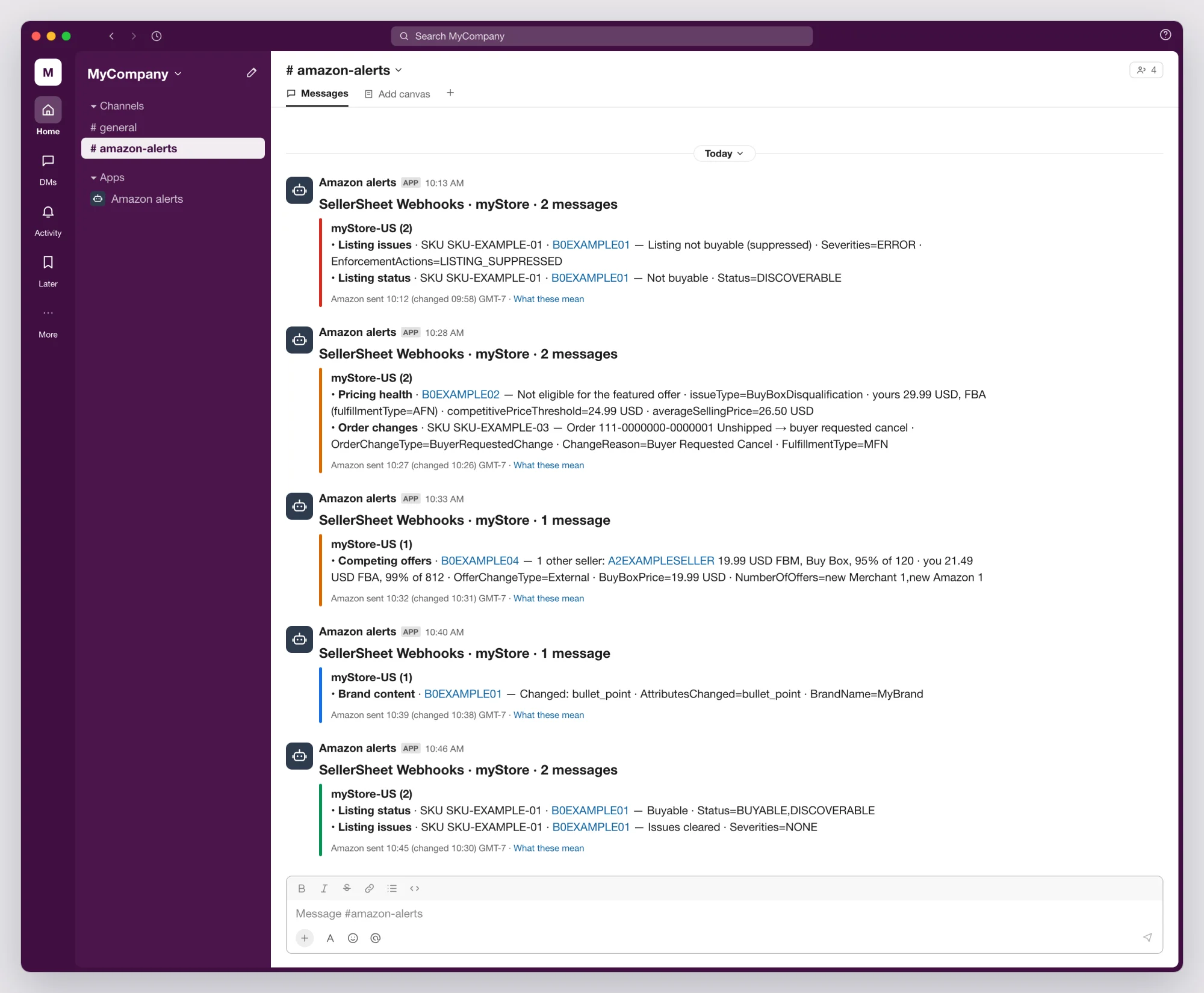
SellerSheet Webhooks · myStore · 3 messages
myStore-US (3)
• Listing issues · SKU SKU-EXAMPLE-01 · B0EXAMPLE01 — Listing not buyable (suppressed) · Severities=ERROR · EnforcementActions=LISTING_SUPPRESSED
• Listing status · SKU SKU-EXAMPLE-02 · B0EXAMPLE02 — Buyable · Status=BUYABLE,DISCOVERABLE
• Competing offers · B0EXAMPLE05 — 1 other seller: A2EXAMPLEOTHER 19.99 USD FBM, Buy Box, 95% of 120 · you 21.49 USD FBA, 99% of 812 · OfferChangeType=External · BuyBoxPrice=19.99 USD · NumberOfOffers=new Merchant 1,new Amazon 1
Amazon sent 02:28 (changed 02:14) GMT-7 · What these mean- One card a minute at most. The first message opens a one-minute window; every message that arrives in it goes on the same card. (A window that reaches 2,000 messages sends its card at once.)
- Title:
SellerSheet Webhooks, the store names (up to two, else the number of stores) and the number of messages. - Colour: the worst severity on the card.
- Sections: one per store ref, for example
myStore-US; "(not connected)" marks a marketplace you have not connected. - Lines: the notification, the SKU and ASIN (the ASIN links to the product page on that marketplace), plain words, then Amazon's own field names and values as
Field=VALUE, so an AI agent in the group can act on the exact codes. A competing seller's ID links to its storefront, which shows its name; up to 5 sellers are listed, then "+N more". - Repeats: identical messages — the same store, notification, text and change time — are one line ending
×N. Each was delivered, and counts. - Long cards: after 40 lines, or the chat app's size limit, the card ends with "+N more — open the delivery log", a link to this webhook's delivery log. Every message the card carries, shown or not, was delivered.
- Footer: when Amazon sent the messages and, in brackets, when the changes happened (with the date if that was an earlier day), in the first store's marketplace time — then What these mean, a link to this section.
Card language
Each chat webhook has a Language: English or 中文. Everything SellerSheet writes on the card follows it — the message count, the notification names, the plain words, "(not connected)", "+N more" and the footer, whose What these mean then opens the Chinese version of this section. Amazon's field names and values (Severities=ERROR, competitivePriceThreshold=24.99 USD), SKUs, ASINs, seller IDs and prices stay exactly as Amazon sends them, so an AI agent in the group reads the same codes in either language. The same card in 中文:
SellerSheet Webhooks · myStore · 3 条消息
myStore-US (3)
• 商品问题 · SKU SKU-EXAMPLE-01 · B0EXAMPLE01 — 商品不可购买(被禁止显示) · Severities=ERROR · EnforcementActions=LISTING_SUPPRESSED
• 商品状态 · SKU SKU-EXAMPLE-02 · B0EXAMPLE02 — 可购买 · Status=BUYABLE,DISCOVERABLE
• 竞争报价 · B0EXAMPLE05 — 1 个其他卖家:A2EXAMPLEOTHER 19.99 USD FBM,购物车,好评率 95%(120 条) · 你 21.49 USD FBA,好评率 99%(812 条) · OfferChangeType=External · BuyBoxPrice=19.99 USD · NumberOfOffers=new Merchant 1,new Amazon 1
亚马逊 02:28 发送(02:14 变更)GMT-7 · 各项含义
HTTPS has no language: its JSON carries Amazon's notification unchanged.
The HTTPS body
Each request is a POST with Content-Type: application/json and these headers:
| Header | Value |
|---|---|
X-SellerSheet-Webhook-Id | The webhook's ID |
X-SellerSheet-Delivery-Id | The delivery's ID — the same on every try |
X-SellerSheet-Timestamp | Unix seconds when this try was sent |
X-SellerSheet-Signature | sha256= and the hex HMAC-SHA256, keyed with your signing secret, of the timestamp, a . and the raw body |
X-SellerSheet-Test | true on a Send test, else false |
The body is one delivery: up to 100 messages, at most 1 MB. A request goes when 100 messages are waiting, or 2 seconds after the first one arrived. An example with one message, made-up values:
{
  "deliveryId": "dlv_8f3a1c9e2b7d4e6fa0b1c2d3e4f5a6b7",
  "webhookId": "0c6f2a8e-4d1b-4e7a-9b35-6e8d2f1a4c90",
  "organizationId": "7b2e9c41-0d3a-4f6b-8e15-9c2a4d6f8b30",
  "sentAt": "2026-10-27T09:28:33Z",
  "attempt": 1,
  "schemaVersion": 1,
  "messages": [
    {
      "messageId": "5c0e8f4a-2b7d-4e91-a3c6-000000000001",
      "messageType": "LISTINGS_ITEM_ISSUES_CHANGE",
      "fingerprint": "sha256:af6e358a51bec4bc1275fba29469312dce87aa4609a42c42564a35c8c190d1a5",
      "store": {
        "storeId": "3f6c2a9e-5b1d-4c8e-9a7f-2d4e6b8c0a11",
        "ref": "myStore-US",
        "sellerId": "A1EXAMPLESELLER",
        "marketplaceId": "ATVPDKIKX0DER",
        "countryCode": "US",
        "connected": true
      },
      "eventTime": "2026-10-27T09:14:03Z",
      "publishTime": "2026-10-27T09:28:30Z",
      "receivedAt": "2026-10-27T09:28:32Z",
      "summary": {
        "text": "SKU SKU-EXAMPLE-01 (B0EXAMPLE01) on US: Listing not buyable (suppressed) · Severities=ERROR · EnforcementActions=LISTING_SUPPRESSED",
        "severity": "critical",
        "sku": "SKU-EXAMPLE-01",
        "asin": "B0EXAMPLE01",
        "severities": ["ERROR"],
        "enforcementActions": ["LISTING_SUPPRESSED"],
        "cleared": false
      },
      "amazon": {
        "notificationType": "LISTINGS_ITEM_ISSUES_CHANGE",
        "notificationVersion": "1.0",
        "payloadVersion": "2023-12-13",
        "eventTime": "2026-10-27T09:14:03.000Z",
        "notificationMetadata": {
          "ApplicationId": "amzn1.sp.solution.00000000-0000-4000-8000-000000000000",
          "SubscriptionId": "9d4b7e2a-6c1f-4a85-b3e0-000000000001",
          "PublishTime": "2026-10-27T09:28:30.000Z",
          "NotificationId": "5c0e8f4a-2b7d-4e91-a3c6-000000000001"
        },
        "payload": {
          "Sku": "SKU-EXAMPLE-01",
          "Asin": "B0EXAMPLE01",
          "SellerId": "A1EXAMPLESELLER",
          "MarketplaceId": "ATVPDKIKX0DER",
          "Severities": ["ERROR"],
          "EnforcementActions": ["LISTING_SUPPRESSED"]
        }
      }
    }
  ]
}
Reading it:
- The delivery.
deliveryIdis the same on every try of one request;attemptcounts the tries (1 to 3).webhookIdandorganizationIdname the webhook and your workspace.schemaVersionis1. messageIdis Amazon's NotificationId: one Amazon message.messageTypeis Amazon's notification type. More types may be added withinschemaVersion1: handle one you do not know by itssummary.text, or skip it.fingerprintis the same for the same change published again by Amazon — see Repeats.storeis your store and the marketplace the message is about:refis the store ref (myStore-US), andconnectedisfalsefor a marketplace you have not connected.- Times are UTC:
eventTimewhen the change happened,publishTimewhen Amazon sent it,receivedAtwhen SellerSheet received it. summaryis SellerSheet's reading: a readabletext, aseverity,sku,asinand the fields of its notification type.amazonis Amazon's notification, every value exactly as Amazon sent it — the source of truth. Amazon spells the keys in PascalCase for some notifications and camelCase for others: read a key in either casing.- Every key is always sent; one with no value is
null. Objects are not closed: ignore a key you do not know.
The JSON Schema (2020-12) of the body is published at sellersheetai.com/schemas/webhooks-v1.json, with one sample delivery per notification at sellersheetai.com/schemas/webhooks-v1-samples.json. Every field, type and example: Webhook message schema.
A Send test carries X-SellerSheet-Test: true and one sample message for each notification the webhook takes, for the made-up store SampleStore. Answer it like any other request, but do not act on its messages.
Verify the signature
Check every request before you trust it:
- Read the raw body bytes, before any JSON parsing.
- Refuse a timestamp more than 5 minutes from your clock — a replayed request fails. Each try has a fresh timestamp, so retries pass.
- Compute HMAC-SHA256 over
timestamp + "." + raw bodywith your signing secret as the key, and comparesha256=<hex>with the header in constant time. - On success, answer
2xxat once and process the messages after; on failure, answer401.
import hashlib, hmac, time

def verify(secret: str, headers, raw_body: bytes, tolerance: int = 300) -> bool:
    timestamp = headers.get("X-SellerSheet-Timestamp", "")
    signature = headers.get("X-SellerSheet-Signature", "")
    if not timestamp.isdigit() or abs(time.time() - int(timestamp)) > tolerance:
        return False
    mac = hmac.new(secret.encode(), timestamp.encode() + b"." + raw_body, hashlib.sha256)
return hmac.compare_digest("sha256=" + mac.hexdigest(), signature)import { createHmac, timingSafeEqual } from "node:crypto";
// headers: lower-case names, as Node gives them; rawBody: a Buffer of the body as received
export function verify(secret, headers, rawBody, tolerance = 300) {
const timestamp = headers["x-sellersheet-timestamp"] ?? "";
const signature = headers["x-sellersheet-signature"] ?? "";
if (!/^\d+$/.test(timestamp) || Math.abs(Date.now() / 1000 - Number(timestamp)) > tolerance) return false;
const mac = createHmac("sha256", secret).update(`${timestamp}.`).update(rawBody).digest("hex");
const expected = Buffer.from(`sha256=${mac}`);
const given = Buffer.from(signature);
return expected.length === given.length && timingSafeEqual(expected, given);
}In Express, read the raw body with express.raw({ type: "application/json" }) on the route; in Flask, request.get_data().
Retries, pause and resume
- Tries. A delivery is tried at once, then again after 20 seconds and after 90 seconds — the same
deliveryId, the nextattempt. Each try waits up to 10 seconds for an answer. - What fails a try: an answer other than
2xx(a redirect included — it is not followed), no answer within 10 seconds, no connection, or a chat app's refusal inside its answer (for example Feishu'scodeor WeCom'serrcode). - A failed delivery. When all three tries fail, its messages are Failed: not billed, and not sent again.
- Pause. After 3 failed deliveries in a row the webhook is Paused — failing and the organization's owner and admins get one e-mail. A delivered one in between starts the count again.
- Resume. The Webhooks page shows a banner for a paused webhook. Resume sends a test message first and turns the webhook back on only if the destination accepts it; otherwise it stays paused and the destination's answer is shown.
- While paused or off, nothing is sent and nothing is billed. Messages that arrive meanwhile are recorded as Skipped in the delivery log and are not sent later.
- Paused — no credits. See Pricing and usage: it turns itself back on.
- Too slow. If an HTTPS endpoint falls 2,000 messages behind, new messages for it fail at once ("the webhook answers too slowly") instead of holding up everyone else's.
- To stop a webhook yourself, edit it and untick Enabled.
Repeats and messageId
Amazon is the source of truth: SellerSheet delivers every message Amazon sends, including Amazon's own repeats, and drops nothing on the way.
- A retry repeats a delivery. If your endpoint processed a delivery but answered too late, the next try brings the same
deliveryIdand the same messages. Keep themessageIds you have handled for a day or two and drop one you already have. - Amazon sometimes publishes the same change again as a new message — a new
messageId, the sameeventTime. Itsfingerprintis the same, so comparefingerprintif you want to act on each change once. On a chat card such repeats are one line×N. - Brand content and Product type definitions arrive once per store you tick — tick one store to get each change once.
- Competing offers on HTTPS: every message arrives, with
sellersChangedandbuyBoxWinnerChangedsaying whether the sellers on the ASIN or the Buy Box winner changed since the previous message; filter on them if you only want those.
Pricing and usage
- 500 delivered messages a month are free, for every organization, on every plan. The count starts again on the 1st of each month (UTC).
- Beyond the 500, each delivered message is paid from the organization's Credits, at the price shown on the Webhooks page. Plans and Credits: Plans and prices and Billing & Credits.
- One message delivered to one webhook is one message. A message two webhooks take counts twice. A chat card counts every message it carries,
×Nlines and "+N more" included. - Never billed: test messages, failed messages, skipped messages (a paused or off webhook), and filtered ones (a chat webhook's competing-offers option).
- 80 %. When the month reaches 400 messages, the owner gets one e-mail.
- Out of Credits. When the month's 500 are used and the Credits run out, the organization's webhooks pause (Paused — no credits) and the owner gets an e-mail. They turn themselves back on after a top-up, or at the start of the next month. About a minute of messages may still be delivered after the balance reaches zero; the balance never goes below zero.
- Where to see it: the top of the Webhooks page shows this month's messages, what is left of the 500 and the Credits spent on webhooks this month; Billing & Credits shows the same in its Credits card; the Credit ledger has one line per charge; the delivery log shows each delivery's billable messages.
The delivery log
Settings → Webhooks → Delivery log lists every delivery and every message of the last 30 days, newest first. Open it from the button at the top of the Webhooks page, from a webhook's row (Open its delivery log, already filtered to that webhook), or from a chat card's "+N more" link.
Show switches between two lists:
| List | One row per | Columns |
|---|---|---|
| Deliveries | HTTPS request or chat card | Sent, Webhook (name and type), Outcome (with a Test tag for a test), Messages sent, Billable (and "billed" once charged), HTTP status, Tries, Error |
| Messages | Amazon message | Received, Notification, Store ("Not a SellerSheet store" when it names none of yours), SKU / ASIN, Webhooks (its outcome at each webhook, or "No webhook took it") |
Filters, kept in the page address so a filtered view can be bookmarked or shared:
- Webhook and Time (Last hour, Last 24 hours, Last 7 days, Last 30 days) on both lists.
- Outcome: Delivered or Failed on Deliveries; Messages add Skipped and Filtered.
- Messages only: Notification, Store, and Search SKU or ASIN — an exact SKU, or an ASIN.
- Reset clears them. The columns button shows or hides columns.
| Outcome | Meaning |
|---|---|
| Delivered | The destination accepted it. Billable beyond the month's free 500. |
| Failed | Every try failed, or the webhook fell too far behind. Not billed, not sent again. |
| Skipped | The webhook was paused or off when the message arrived. Not billed, not sent later. |
| Filtered | A chat webhook with Competing offers: only when the sellers or the Buy Box winner change, and only a price moved. Not billed. |
Open on a message shows its Message ID, Received, Event time, Store, SKU / ASIN, Fingerprint, its outcome at each webhook, and The message as sent — the message's JSON exactly as delivered, with Copy JSON. The JSON is ready a few minutes after the message arrives (until then the panel asks you to open it again shortly) and is kept 30 days.
Troubleshooting
Send test, the log's Error column and the paused banner show the destination's own answer:
| You see | Fix |
|---|---|
| Feishu 19021 | Signature check failed: paste the secret again, exactly as Feishu shows it — or remove it if the bot does not verify signatures. |
| Feishu 19022 | The bot has an IP allowlist: contact support for the IP to allow. |
| Feishu 19024 | Keyword check failed: add the keyword SellerSheet. |
| DingTalk 310000 | A security setting refused it: check the keyword SellerSheet, the 加签 secret or the IP setting. |
| DingTalk 300001 · WeCom 93000 | The robot's address is no longer valid: copy it again. |
| DingTalk 130101 · WeCom 45009 | The app's rate limit: several webhooks post to the same group. Combine them into one. |
| Slack: invalid_token, no_service | The Slack webhook was removed: create a new one. |
| Teams: … | The workflow refused it: check the workflow in Teams. |
| HTTP 3xx (redirects are not followed) | Use the final address. |
| HTTP 401 / 403 from your endpoint | Your signature check refused it: verify over the raw body, with the secret saved on the webhook. |
| no answer within 10 s | Answer 2xx first and process after. |
| could not connect | The endpoint is down or not reachable from the internet. |
| That address is not on the public internet | Use a public https:// address on port 443. |
A webhook receives nothing:
- Its status is Active — not paused or off.
- The notifications and stores you want are ticked, in the workspace that owns the store.
- Include marketplaces not connected to SellerSheet is on, if the change was on a marketplace you have not connected.
- In the delivery log, Messages shows whether the message arrived at all and what happened to it at each webhook (Skipped, Filtered, "No webhook took it").
- A marker on the store's cell in the edit panel says when Amazon refused the subscription. When it names a permission the store's authorization does not include, re-authorize the store on Stores & Marketplaces; if it keeps failing, contact support.
FAQ
Who can manage webhooks?
The owner or an admin of the workspace. Members do not see the Webhooks page.
How many webhooks can a workspace have?
Up to 10.
Why can't I tick some notifications?
A grey row is a notification the webhook cannot take: Amazon Ads (it arrives as data in your report tables, not as webhooks) or shipment tracking milestones (not available yet), or, on a chat destination, one that is HTTPS only — hourly metrics, a message for every change, or a signal for your own code. The row says why.
What do webhooks cost?
Every organization gets 500 delivered messages a month free, on every plan. Each delivered message beyond them is paid from the organization's Credits, at the price shown on the Webhooks page. Test, failed, skipped and filtered messages are never billed.
Can a webhook send e-mail?
No. E-mail is not a destination; use a chat group or an HTTPS endpoint. SellerSheet still sends its own notices by e-mail: to the owner and admins when a webhook pauses after failed deliveries, and to the owner at 80 % of the month's free messages and when Credits run out.
Do webhooks read my Google Sheets?
No. Webhooks pass on Amazon's notifications; SellerSheet does not read or write your sheets to send them.
What happened to SellerSheet Alerts?
Alerts is now Webhooks. The same notifications and chat apps, plus 17 more of Amazon's notifications, on every plan, up to 10 per workspace, and HTTPS for your own systems.